Using Redis in Golang — Learning Golang
INTRODUCTION
Before we begin, let’s first understand what Redis is. In short, Redis is an open-source tool used as a database, cache, or message broker.
In this tutorial, we will use simple Redis operations, namely SET and GET, for data storage.
PREREQUISITE
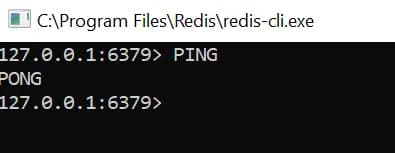
To run Redis in our local environment, make sure we have installed Redis. If not, we can download it here. Once installed and running, we can use the following command to check if Redis is ready.
PING
Use the following command to import the go-redis package.
go get github.com/go-redis/redis--ProjectGO
---pkg
---src
---cache
---CacheProcess.go
---interfaces
---Cache.go
---models
---Employee.go
---util
---RedisConn.go
---main.goSETUP REDIS CONNECTION
First, we will create code to connect to our local Redis.
package util

import (
	"github.com/go-redis/redis"
	"context"
	"fmt"
)

type RedisConn struct{
	Ctx  context.Context
}

func (conn *RedisConn) Conn() (*redis.Client, error){

	client := redis.NewClient(&redis.Options{
		Addr: "localhost:6379",
		Password: "",
		DB: 0,
	})

	pong,err := client.Ping(conn.Ctx).Result()

	if(err != nil){
		fmt.Println("Redis Connect Failed : ",err)
	}else{
		fmt.Println("Redis Connect Success : ",pong)
	}

	return client,err
}
CACHE INTERACTOR
Next, we will create SET and GET functions to store and retrieve data from Redis. Two important things to note in the SET and GET functions are Key and Value. For example, when we want to SET data, we can use the Cache.Set(Key, Value, 0) function. The Key, a string, is used as the keyword for the Value we SET, which is an object.
package interfaces

import(
	"../models"
)
type Cache interface{

	Set(key string, value []models.Employee) (err error)
	Get(key string) (res []models.Employee, err error)

}
package cache
import (
"../models"
"context"
"github.com/go-redis/redis"
"encoding/json"
)
type CacheProcess struct {
Cache *redis.Client
Ctx context.Context
}
func (redis *CacheProcess) Set(key string, value []models.Employee) (err error) {
Json, _ := json.Marshal(value)
set := redis.Cache.Set(redis.Ctx, key, string(Json), 0)
if err := set.Err(); err != nil {
return err
}
return nil
}
func (redis *CacheProcess) Get(key string) (res []models.Employee, err error) {
val,err := redis.Cache.Get(redis.Ctx, key).Result()
if err != nil {
return []models.Employee{}, err
}
err = json.Unmarshal([]byte(val), &res)
if err != nil {
return []models.Employee{}, err
}
return res,err
}Next, we will call the functions for connection, SET, and GET that we created in main.go.
package main

import (
    "context"
	"./util"
	"./cache"
	"./models"
)

func main(){
	redisSetup  	:= &util.RedisConn{Ctx : context.Background()}
	redisConn,_     := redisSetup.Conn()
	cache 	   		:= &cache.CacheProcess{Cache : redisConn, Ctx : context.Background()}

	employees := []models.Employee {
		models.Employee {
			Id: 1,
			Name: "Iron Man",
			Nik: "111",
			Division: "IT Developer",
		},
	}

	cache.Set("Employee", employees)
	cache.Get("Employee")

}
RESULT
Next, we will try to monitor to see if we have successfully SET data to Redis using the Employee Key and an array of Employee structs as the Value, and GET data from Redis using the Employee Key .
Result
 © Izzat.